Choose a file for the repair desk
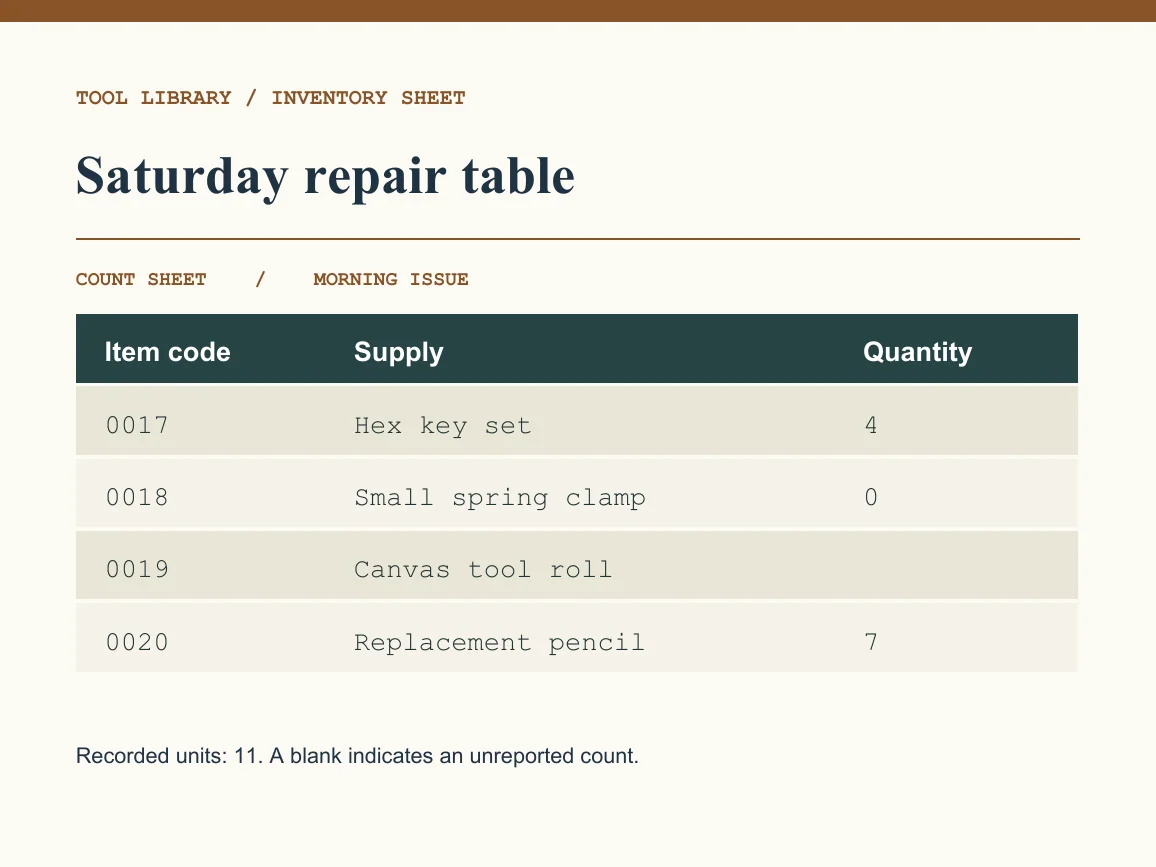
The repair desk needs an inventory it can match to its catalog before placing an order. Someone has sent two possible CSV files. Both have four rows. Both add up to 11 units. You have time to check two rows before you reply. Which two would you pick?
Open the original PDF · Download both candidate CSVs and the PDF
| Printed supply | Candidate A: code / quantity | Candidate B: code / quantity |
|---|---|---|
| Hex key set | 17 / 4 | 0017 / 4 |
| Small spring clamp | 18 / 0 | 0018 / 0 |
| Canvas tool roll | 19 / 0 | 0019 / (empty) |
| Replacement pencil | 20 / 7 | 0020 / 7 |
Reveal the handoff decision
Send B. On the PDF, 0018 has an explicit zero. The quantity beside 0019 is empty, and the note under the table says a blank is an unreported count. A changes that unknown into a claim that someone counted the rolls and found none. It also drops the two leading zeros from every catalog identifier. A text-key lookup for 0017 can now miss a stocked item. Adding the quantity column exposes neither error.
What stands out in Tabula
A tidy PDF can turn into a spreadsheet where one wrapped description creates a phantom row and a blank value shifts every number to the left. Tabula lets you mark the table area and inspect the extracted rows before export. Its local browser interface makes repeated experiments with the rectangle inexpensive. The quality check should focus on whether each value still belongs to the correct row and column. A CSV that opens successfully proves very little on its own.
Walkthrough
- Try selecting a table cell in your PDF viewer and copying the text. Tabula is designed for PDFs with text, so a scan that behaves like one large photo is a different starting point. Choose a page containing at least one empty cell or wrapped row for the pilot.
- Start the desktop application, open its local browser interface, and import the PDF. Draw a rectangle tightly around the table. Leave the page title, source note, and page number outside it. Include the header if every heading lines up with one intended data column.
- Preview the extraction. Read across a normal row, a wrapped row, and a row containing a blank. If a heading was pulled into the body or two rows were merged, adjust the selection and preview again before spending time repairing a spreadsheet.
- Export the accepted result to CSV. Import identifiers such as 0017 as text in your spreadsheet so leading zeros survive. Compare the number of data rows and one published total with the PDF. Then check the first and last rows of any continuation page.
Find the stage where the damage happened
Compare three views of row 0019: the PDF, Tabula’s extraction preview and the exported CSV opened in a plain-text editor. A row ending in a comma after “Canvas tool roll” has an empty final field. A zero after that comma is an explicit value. If the preview already has the wrong cells, adjust the selection and repeat. If the raw CSV is right but the spreadsheet displays 19, reimport the identifier column as text.
Do this before padding identifiers with zeros. Adding two zeros happens to fix these four examples. A future catalog can contain three-digit codes or letters. The raw file tells you whether you need a better extraction, a different import setting or a correction to the source.
What to put in the delivery note
“Four catalog rows. Three quantities reported, totaling 11 units. Count outstanding for 0019, Canvas tool roll. Item codes are text.” This gives the receiver both the verified quantity and a specific follow-up. The two candidates in this exercise illustrate possible handoff outcomes. Neither is presented as a measured Tabula default.
Field tip
If a page has a table and a footnote aligned directly beneath the last column, start with a rectangle that excludes the footnote. Preserve it separately as a note about the data. A numeric footnote marker can otherwise look like an extra value.
Where it falls short
An image-only table requires another route. Even an OCR text layer may place characters in the wrong spatial positions. For a short, irregular table, manually verifying every cell can be quicker than repeatedly adjusting the selection.
Try it yourself
Extract the supplied count sheet yourself and compare your raw CSV with candidate B. Ask a colleague to find item 0017 and name the item whose stock still needs a count. Passing both checks shows that the file can support the next job.
Download practice file · ZIP ↓